Longer Cube 2 Reviews: See Why 0 Shoppers Rated It 0 Stars!
Is the Longer Cube 2 3d printer overhyped or underrated? The 0/5 from 0 people might just give you the clarity you need.


 Recaptor
Longer Cube 2: A Compact 3D Printer for Beginners and Hobbyists
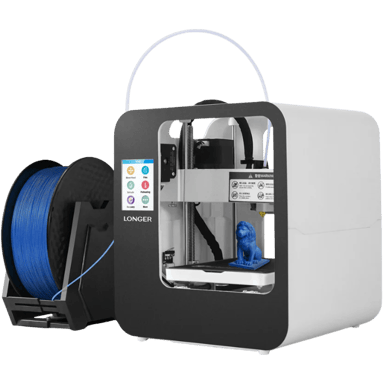
The Longer Cube 2 has carved out a niche as a consumer-friendly FDM 3D printer designed with beginners in mind. Released in 2019 by LONGER, this prebuilt machine aims to deliver a balance of simplicity and respectable print quality without overwhelming newcomers to 3D printing technology. On paper, the Cube 2 offers a reasonable build volume combined with dependable hardware, making it ideal for prototyping, miniatures, and basic engineering applications. Its thoughtfully compact footprint suggests a printer that fits easily on a desktop, catering to hobbyists and educational users looking for an accessible entry point to creative fabrication.
Specs & Features In-Depth: Engineering Simplicity With Value
According to specifications, the Cube 2 sports a neat build space measuring 3.94 inches cubed, resulting in a total build volume of about 61 cubic inches. This size is modest but sufficient for small-scale projects. The device operates on an internal power supply with a broad 100-240 Volt range, ensuring compatibility across many regions. When active, the printer consumes around 78 watts, with an idle consumption limited to 10 watts, suggesting reasonable energy efficiency for its category.
The printer supports a standard 1.75 mm filament diameter and accommodates common materials like PLA, ABS, and wood-infused filaments. Its maximum extruder temperature reaches 482°F, allowing ample flexibility for temperature-sensitive filaments, while the heated bed can warm up to 212°F, enhancing print adhesion for demanding materials. Performance-wise, the printer offers a minimum layer resolution of 50 microns, allowing detailed layer precision, with a maximum layer height of 300 microns for faster prints.
The single Bowden extruder setup is typical for beginner models but augmented by the ability to swap nozzles quickly to 0.2, 0.6, or 0.8 mm for varied print quality and speed demands. The printer also includes a filament dry box, compounding its storage solutions to preserve material quality. Structurally, the Cube 2 adopts an open Cartesian frame with a magnetic, flexible build plate offering a textured surface, which is removable for simplified print removal. The printer's 3.5-inch touchscreen interface ensures intuitive navigation alongside essential features such as manual bed leveling and a filament runout sensor.
The inclusion of power-loss recovery adds practical resilience to unexpected power interruptions. Given its blend of core hardware and software compatibility, namely Cura slicer support and USB or SD card file transfer methods, the Cube 2 balances beginner accessibility with efficient performance features, backed by a one-year warranty bolstering consumer confidence.
Design & Build
The Cube 2's compact dimensions (8.66 inches on each width and depth axis, and just over 10 inches tall) and relatively light weight of 15.43 pounds make it an easy desktop companion suited for home or light workshop use. Its open-air Cartesian design favors ease of access to the build plate and extruder components but sacrifices enclosure-based temperature control. This suits users who prioritize simplicity and straightforward maintenance. The internal power supply reduces cable clutter, and essential fans maintain adequate cooling during long print jobs. The printer's manual bed leveling procedure, while less automated than higher-end machines, offers hands-on control appreciated by educational users and tinkerers. The magnetic and flexible build plate simplifies print removal, reducing frustration often associated with part extraction.
Performance
Performance optics focus on print speed, capped officially at 80 mm/s, with effective measured speeds closer to 50 mm/s, striking a balance between print quality and throughput. The minimum 50-micron layer resolution capability indicates that the Cube 2 can produce finely detailed objects, which is surprising for an entry-level model. Noise levels during operation hover around 55 dB, which is moderate and unlikely to be disruptive in a home environment. The inclusion of power-loss recovery is a significant practical feature, enabling the printer to resume mid-print after outages, and the filament runout sensor proactively prevents failed prints. The manual first-layer calibration is standard for beginners' machines but may require learning patience.
Connectivity & Software
Connectivity is basic but effective, with USB support and an SD card slot, allowing straightforward file transfers. The printer's compatibility with the widely used Cura slicing software means it benefits from continuous updates and wide community support, essential for troubleshooting and optimizing prints. Firmware updates are supported, helping keep the printer's software current without hassle, although remote monitoring and cloud functionality are absent, which is consistent with its budget-friendly and beginner-focused profile.
Pros & Cons
Pros
- Compact and lightweight design ideal for desktop use.
- Good print resolution (50 microns) for detailed prints.
- Features include a filament runout sensor and power-loss recovery for reliability.
- A one-year warranty provides buyer reassurance.
Cons
- Manual bed leveling can be challenging for absolute beginners.
- Open frame design offers no enclosure for temperature regulation.
- Lacks advanced connectivity features like remote monitoring.
Price & Value for Money
At $199 available from the official LONGER website, the Cube 2 delivers a noteworthy value proposition. Given the one-year warranty and the inclusion of practical features like a filament runout sensor and power-loss recovery, the pricing feels reasonable for beginners entering the 3D printing space. This printer is not designed for high-volume professional manufacturing but rather for education and hobbyist prototyping, where accessibility and simplicity are paramount. If your primary requirements include relatively detailed print quality within a compact footprint and straightforward operation, the Cube 2 fulfills these efficiently without burdening users with complex setup or high cost. On the flip side, users seeking more automation or multi-material capability might look toward pricier alternatives.
Quick Take
In short, the Longer Cube 2 balances compact design, decent build volume, and solid beginner-friendly features at a budget price. Its layering accuracy and reliable recovery functions stand out for a printer in this cost range. While it does lack enclosed construction and some advanced automation, it remains a capable, entry-level choice for 3D printing enthusiasts.
Closing Recommendation
The Longer Cube 2 may be ideal for hobbyists and educators requiring a simple, compact machine capable of decent resolution prints with basic materials. Its engineering data-backed performance and included safety features like overheat protection and CE certification inspire confidence. Users looking for automation or industrial-grade features might find the Cube 2 somewhat limited. Still, its clear focus on ease of use makes it a user-friendly option that helps newcomers achieve reliable results.
Verdict
Rating: Based on the specifications and overall feature set, we believe Longer Cube 2 deserves 4.1 out of 5.
- Winner Feature => impressive print detail capability and practical reliability features at a budget price.
- Needs Improvement => absence of automatic bed leveling and enclosure for better temperature control limits advanced usage.
Reviews 0
The good, the bad, and the brutally honest.Average Rating


More 3D Printers 453
Unlock more awesome finds.